Posts

Samsung Announces Galaxy S7 edge Olympic Games Limited Edition with Launch of Global Rio 2016 Olympic Games Campaign
Image
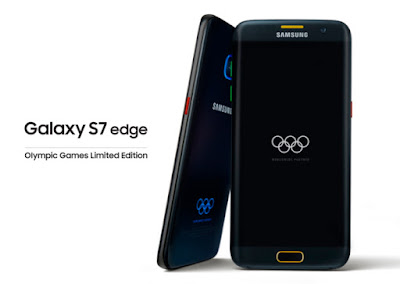
In celebration of the Rio 2016 Olympic Games, Samsung Electronics, Worldwide Olympic Partner in the Wireless Communications Equipment category, today unveiled the Galaxy S7 edge Olympic Games Limited Edition in Sao Paulo, Brazil. Samsung also announced the Rio 2016 app and on-the ground activations throughout Brazil to mark the official launch of Samsung’s global Rio 2016 Olympic Games campaign. In collaboration with the International Olympic Committee (IOC), Samsung will deliver 12,500 Galaxy S7 edge Olympic Games Limited Edition and Gear IconX to all Rio 2016 Olympians, helping them to enhance their experiences in Rio and communicate with family and friends around the world more conveniently. For the first time ever, the Rio 2016-inspired device incorporates an Olympic Games design embedded into the phone itself, featuring a custom colorway pattern including the five official colors of the Olympic Rings. The colors of the Olympic Rings will also be prominent...

Android 7.0 Nougat- The wait is over!!

Image
After a lengthy Developer Preview program starting in March, the final version of Android 7.0 (codenamed "Nougat") is finally launching today. The OS update will slowly begin to rollout to devices over the next few weeks. This year, Google is adding even more form factors to the world's most popular operating system. After tackling watches, phones, tablets, TVs, and cars, Nougat brings platform improvements aimed at virtual reality headsets and—with some help from Chrome OS—also targets laptops and desktops. For Android's primary platform (still phones and tablets), there's a myriad of improvements. Nougat brings a new multitasking split screen mode, a redesigned notification panel, an adjustable UI scale, and fresh emoji. Nougat also sports numerous under-the-hood improvements, like changes to the Android Runtime, updates to the battery saving "Doze" mode, and developer goodies like Vulkan and Java 8...

The new HONOR 8 and HONOR 5- A new stylish affordable flagship smartphone!

Image
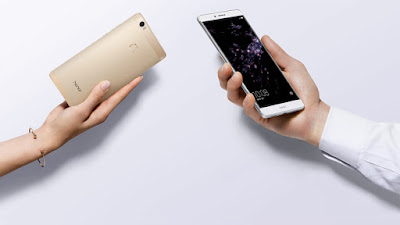
The Honor 8 isn’t necessarily fresh news given that it was announced last month headed to the Chinese market. What’s new, though, is that the sub-brand of Huawei is making a statement by launching the Honor 8 in the US with a competitive price point that’s tough to overlook. Although it’s tough to say how the Honor 5X from early in the year performed in terms of sales, the Honor 8 fashions together a bevy of goodies that makes for a compelling offering. Ahead of our full review, let’s a quick look at Honor’s latest smartphone for the US market. Huawei’s honor line up of devices has created quite a buzz in the market due to their top end specifications and extremely down-to-earth prices. The other two high-end smartphones, the honor V8 and honor 8, launched earlier this year, and came with dual rear cameras and some cutting edge hardware. The honor Note 8, which was earlier rumored to be called as honor V8 Max, also packs quite a punch. The new phablet r...

Cyanogenmod rolls out a new stable snapshot build of CM13!

Image
The day has come for anyone interested in flashing CyanogenMod but who’s not interested in the messy business of release candidate builds or nightlies. The latest stable snapshot build of CM 13 (ZNH5Y) is now rolling out for the core group of supported devices, bringing things up to Android 6.0.1 r61. There’s a huge amount of stuff to cover, so read on for the highlights. There’s a new (black) boot animation screen and the new build contains the August security patch (patching two of the four Quadrooter vulnerabilities in the process – the only two the CM team had access to). Wi-Fi hotspots will automatically turn off after being inactive for a while and there’s new notification light controls for Profiles and DND/Priority Mode. You can restrict apps to only use data over Wi-Fi (or cellular) or block internet access entirely. A new Bluetooth device battery icon appears in the status bar so you can keep an eye on paired device power levels and the lock screen wallpape...

The Blackberry HUB now works on any android running Marshmallow!

Image
BlackBerry Hub+ is the first pure software offering from the new Mobility Solutions Group. But it’s a natural move for us. Not only is it the latest example of BlackBerry’s fast-emerging software business (already at a  run rate exceeding $500 million a year ), but it fulfills our promise to make the fruits of decades of R&D and software development as widely available to users of other devices and other platforms as possible. BlackBerry Hub+ for Android is a new suite of apps that should be familiar to any BlackBerry 10 user. It helps centralize all of the user’s communications into a single, unified interface, as well as help streamline many other productivity tasks such as Calendaring,  Passwords , and many others. The Hub is one of  the most popular features of BlackBerry 10 as well as the PRIV . Popular tech blog Engadget calls the Hub’s unified inbox the solution to “ messaging’s Mission Impossible” : the deluge of communications we all face today in th...

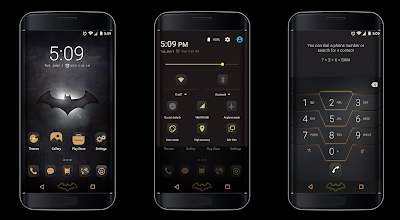
S7 Edition Batman edition theme for cm13/12.x (free)

Image
Recently Samsung revealed the new Samsung Galaxy S7 Injustice (Batman) Edition, which comes with all new Batman theme. Screenshots- The developer has shared both free and paid versions. Download links: 1. Free: Download here 2. Playstore(Paid): Download here

The new google nexus launcher!

Image
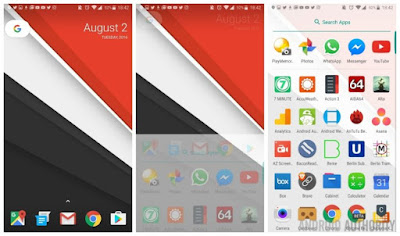
That didn’t take long. The new Google Nexus launcher APK is now available for download. I’ve installed it and it’s the real deal, complete with the new slide-up app drawer and Google ‘button’ for quick search and access to Google Now. APK: the easy method. Install the APK above. Simply enable  Unknown Sources  in your Security settings, install the Nexus Launcher APK  (or  mirror ), hit home and choose Nexus Launcher. You will get all the Nexus Launcher features except  swiping right for Google Now won’t work  (this is because the launcher needs to be installed as a system app for that to work). You can still access Google Now by tapping the G button once to open search and then the ‘G’ again to launch Google Now.  Update:  While initially attempting to open the wallpaper picker would force close the launcher, you can now  install the Wallpaper Picker APK  to fix the Nexus Launcher force close bug.      ...